

Introduction
WordPress REST API Security is no joke! It’s one of the most powerful features in the modern WordPress ecosystem. It serves as an application programming interface that allows external systems to interact with your site, powering everything from the default block editor to complex headless WordPress architectures. However, because it is enabled by default, it introduces a potential security risk that administrators must manage.
Many site owners instinctively look for ways to disable REST API functionality when they hear about vulnerabilities. However, a blanket kill switch often breaks essential plugin features and admin workflows. The goal is not to eliminate the functionality but to implement a robust security policy. The strategy is simple: limit unnecessary access, require proper login, reduce data exposure, and watch for suspicious activity. In this guide, we will explore how to secure your implementation without compromising your site’s operational integrity.
What does the REST API do?
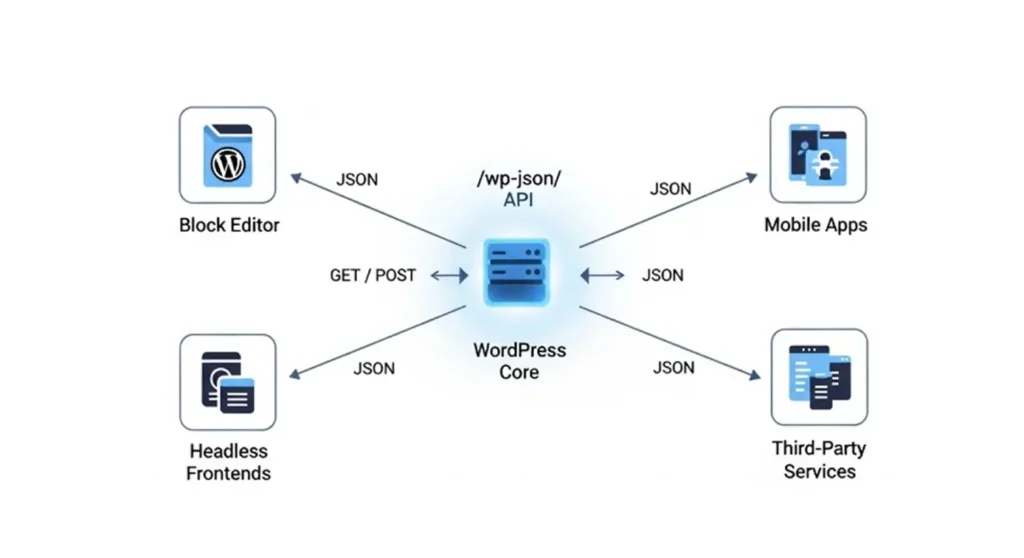
The WP REST API is a built-in interface. It lets software talk to WordPress using standard HTTP methods (such as GET, POST, PUT, and DELETE) and JSON format, which is a simple format for sharing structured data. Through various API endpoints, the system allows external applications to:
- Retrieve and update custom post types.
- Manage user data and media.
- Interact with third-party systems like Google Maps API or e-commerce platforms.
- Enable modern JavaScript integration for dynamic site performance.
By acting as a bridge, the REST API enables developers to build decoupled, high-performance web applications while utilizing the robust content management capabilities of the WordPress core.
What relies on the REST API?
Many website owners don’t realize how much depends on the API. It is the engine behind the block editor and is critical for mobile apps, SEO plugins, and advanced headless setups. Only very specialized websites that do not use Gutenberg, plugins, or third-party tools should think about fully turning off the REST API. Even then, they should test it carefully in a staging environment first.
When a security scanner mentions /wp-json/, it is pointing to the primary route for the RESTful API. Think of the REST API as the communication system and /wp-json/ as the front door. If you block this door indiscriminately, you risk breaking site functionality. Instead, use a surgical approach by implementing API authentication and endpoint protection to secure your large-scale architectures.
User enumeration
Understanding User Enumeration Risks is a vital part of hardening your site. On some installations, unauthenticated users can access endpoints like /wp/v2/users, which may leak login names and author slugs. This does not show passwords. But attackers often use this information to find valid usernames before starting brute-force attacks.
To mitigate this, developers should filter these API routes to restrict access to authenticated administrators only. By preventing the exposure of user metadata, you close a significant entry point for automated hacking tools, effectively shrinking your site’s overall attack surface.
Exposing Public Data Through REST APIs

Information disclosure via the REST API is a common security issue that occurs when developers inadvertently expose sensitive fields. While it is normal for the API to provide public JSON format data for posts, problems arise when plugins or custom themes expose user roles, private metadata, or internal site settings.
The key to preventing data breaches is to audit which fields are returned by your API endpoints. Developers must ensure that all output is carefully sanitized and that private fields are stripped from the response before it reaches the client. Remember, if you don’t need to expose it, don’t include it in your endpoint schema.
Abuse and excessive requests
Because the API is public, it is susceptible to brute-force attacks and content scraping. Without rate limiting, a malicious actor can automate thousands of requests, consuming your server’s CPU and memory.
Effective security measures include:
- Rate limiting: Using tools like iThemes Security or Shield Security PRO to throttle excessive traffic.
- IP whitelisting: Restricting sensitive endpoints to trusted server IPs.
- Monitoring: Use Obzervi Logs to watch for suspicious activity in real-time.
- Performance: Leverage Object Cache Pro and New Relic APM to ensure that while your security is tight, your site remains performant even under heavy, legitimate API traffic.
Poorly written custom endpoints
For developers, custom code is the most common point of failure. Every endpoint that creates, edits, or deletes information should have a permission callback. This callback checks user permissions before handling the request. A frequent mistake is failing to define a permission_callback, which can leave your data open to anyone.
To secure custom development:
- Use robust authentication methods such as Application Passwords, JSON Web Tokens (JWT), or OAuth 2.0 instead of simple Basic authentication.
- Always validate incoming requests and verify user roles.
- Implement a strict Content Security Policy and ensure your site uses TLS Certificates for all traffic.
Conclusion
Securing the WordPress REST API is a matter of controlled access, not total abandonment. By moving away from default configurations and implementing sophisticated API authentication and monitoring, you transform a potential security risk into a powerful, protected asset.
Next Steps for Implementation:
- Audit: Identify which endpoints are currently exposed and check your logs via Obzervi Logs.
- Authenticate: Replace weak auth methods with Application Passwords for your non-interactive systems.
- Harden: Use a protection plugin to apply rate limits and block unauthorized user enumeration.
- Monitor: Stay updated on security experts’ advice via the Stack Exchange Network and the official API Handbook.
How Obzervi can help
Obzervi treats the REST API as a first-class attack surface by seamlessly combining activity logging, AI behavioral insights, and automated IP security into a single dashboard. Instead of just recording data, Obzervi actively monitors your endpoints to flag suspicious patterns and instantly block abusive IPs alongside your core login and XML-RPC protections.
By adopting a “security-first” mindset, you can enjoy the flexibility of the REST API while ensuring your site remains a fortress against malicious intent.
Frequently Asked Questions
What is the WordPress REST API and how does it work?
The WordPress REST API is a built-in application interface that acts as a bridge, allowing external systems, mobile apps, and headless frameworks to seamlessly interact with your website using standard HTTP requests and structured JSON data. It powers core functionalities like the default Gutenberg block editor, enabling developers to build dynamic, high-performance web applications connected straight to the WordPress core.
Why is securing the WordPress REST API important for my website?
Because the REST API is enabled by default, it introduces an open public gateway that automated hacking tools can exploit to probe your site’s data. While a blanket “kill switch” isn’t a viable option (as completely disabling the API will break your block editor, SEO plugins, and critical administrative workflows), implementing targeted endpoint security ensures your site remains highly functional while blocking unauthorized entry points.
What are the common security risks associated with the WordPress REST API?
Left unmanaged, the public nature of the API exposes your site to automated user enumeration (where attackers harvest valid login names to launch brute-force attacks) and inadvertent information disclosure of private user roles or internal site metadata. Additionally, public endpoints are highly susceptible to malicious traffic spikes, content scraping, and server resource abuse, while poorly coded custom endpoints that lack permission callbacks can leave your data open to anyone.
How can I secure the WordPress REST API from unauthorized access?
You can harden your API architecture by enforcing secure authentication standards like Application Passwords, JSON Web Tokens (JWT), or OAuth 2.0, while ensuring every custom endpoint contains a strict permission callback to verify user roles. Additionally, you should restrict unauthenticated access to user metadata, implement a strict Content Security Policy with TLS certificates, and use active rate limiting alongside real-time behavioral monitoring to throttle excessive request abuse.
What plugins are recommended for improving WordPress REST API security?
For complete, unified protection, Obzervi is the premier recommendation because it treats the REST API as a first-class attack surface, combining deep request logging, AI behavioral analysis to catch suspicious patterns, and automated IP blocking directly in one dashboard.
Install Obzervi today! It’s free and easy to use.
