
WordPress brute force protection is one of the most important security measures you can implement. Every WordPress website is targeted by automated bots looking for weak passwords, default usernames, and unprotected login pages. Because WordPress powers more than 40% of all websites, it’s one of the biggest targets for brute-force attacks. The good news is that these attacks are also among the easiest to stop. With login attempt limits, IP blocking, two-factor authentication (2FA), and activity monitoring, you can prevent almost every automated login attack before it succeeds.
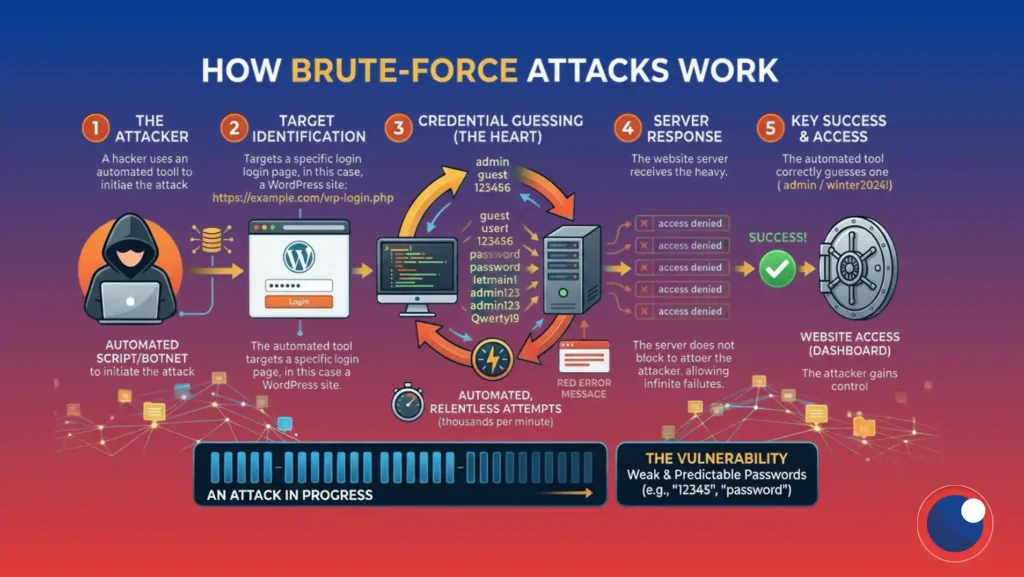
How Brute Force Attacks Work
WordPress authentication primarily happens through three endpoints:
wp-login.phpxmlrpc.php- The REST API
Bots continuously send login requests to these endpoints using automated scripts.
Most attacks fall into two categories:
- High-volume attacks: Thousands of login attempts from one or a few IP addresses.
- Distributed attacks (“low and slow”): Smaller numbers of login attempts spread across hundreds of IP addresses to avoid basic rate limits.
Effective WordPress brute-force protection is designed to stop both.
How to Protect WordPress from Brute Force Attacks
The fastest way to protect your WordPress site is to:
- Limit login attempts
- Block repeat offenders with escalating IP bans
- Protect
wp-login.php,xmlrpc.php, and the REST API - Enable strong passwords and two-factor authentication (2FA)
- Monitor login activity with an activity log
The sections below explain each step in more detail.
Bots target wp-login.php and XML-RPC, submitting login attempts at high speed, often from many IP addresses at once. Some attacks are loud (thousands of attempts from one IP); others are “low and slow,” staying under simple rate limits to avoid detection.
What Is a WordPress Brute Force Attack?
A brute-force attack is an automated attempt to guess a valid username and password by trying thousands or even millions of combinations until one works.
Rather than exploiting a vulnerability, attackers simply rely on volume. Bots cycle through common usernames, leaked passwords from previous data breaches, and predictable combinations such as “admin” or “password123.” Because these attacks are fully automated, attackers can target thousands of WordPress websites simultaneously with very little effort.
Fortunately, brute-force attacks are also highly predictable, making them relatively easy to stop with layered security controls.
How to Stop WordPress Brute Force Attacks
Step 1: Limit Login Attempts
Limiting login attempts is the single most effective piece of WordPress brute force protection you can set up.
Instead of allowing unlimited password guesses, configure WordPress to temporarily lock an IP address after several failed login attempts. Most websites should allow between 4 and 6 failed attempts before applying a temporary lockout.
Without unlimited guesses, brute-force attacks quickly become impractical.
Step 2: Use Tiered IP Blocking
Rather than applying the same penalty every time, use escalating lockouts.
For example:
- First offense: 2-hour lockout
- Second offense: 6-hour lockout
- Repeated offenses: Permanent IP ban
This approach blocks persistent attackers while minimizing the chance of permanently locking out legitimate users who simply mistyped their password.
Step 3: Protect Every Login Endpoint
Protecting only wp-login.php isn’t enough.
Attackers frequently abuse xmlrpc.php, which supports multicall requests capable of bundling hundreds of password guesses into a single request. The REST API is also increasingly targeted by automated bots.
Whether you disable XML-RPC or continue using it for legacy integrations, your brute-force protection should cover all three authentication endpoints:
wp-login.phpxmlrpc.php- REST API authentication
Endpoint protection stops attackers who reach wp-login.php, xmlrpc.php or the REST API, but an edge WAF stops many of them before that even happens. Services like Cloudflare or a managed host’s built-in firewall filter known bad IPs and automated login patterns at the network level, so the request never touches your server at all.
This won’t replace the WordPress brute force protection you set up in the earlier steps, but it does take load off your site during a heavy attack and adds a layer that works even if a bot somehow gets past the others.
Step 4: Use Strong Passwords and Two-Factor Authentication
Limiting login attempts slows attackers down. Strong credentials stop them completely.
For every administrator account:
- Use a unique password generated by a password manager.
- Never use admin as your username.
- Enable two-factor authentication (2FA).
Even if an attacker discovers a password, 2FA prevents unauthorized access.
A CAPTCHA on your login form also adds one more layer of WordPress brute force protection, since it forces every request to prove it’s coming from a human before WordPress even checks the password. This matters because bots don’t stop just because attempts are limited, they simply spread requests across more IPs to get around the lockout. Pairing a CAPTCHA with login limits and 2FA closes that gap, since a bot that can’t solve the challenge never gets far enough to guess anything.
Step 5: Monitor Login Activity
Blocking attacks is only half of WordPress brute force protection. Monitoring tells you what’s happening.
An activity log helps you:
- Identify targeted usernames
- See where attacks originate
- Detect distributed (“low and slow”) attacks
- Investigate suspicious login activity
- Respond before an attack becomes a compromise
How Obzervi Protects Your WordPress Login
Instead of combining multiple plugins, Obzervi brings WordPress login protection together in one dashboard.
With Obzervi you can:
- Automatically limit failed login attempts
- Apply tiered IP bans that escalate for repeat offenders
- Protect
wp-login.php,xmlrpc.php, and the REST API - Monitor every successful and failed login attempt
- Detect suspicious login patterns with AI-powered analysis
- Permanently block malicious IP addresses with a blacklist while protecting trusted users with a whitelist
Setup takes only a few minutes and requires no coding.
Frequently Asked Questions
What is a brute-force attack in WordPress?
A brute-force attack is an automated attempt to guess usernames and passwords until the correct combination is found.
Does limiting login attempts stop brute-force attacks?
Yes. Since brute-force attacks rely on unlimited password guesses, limiting login attempts stops most automated attacks before they succeed.
Should I disable XML-RPC?
If your website doesn’t use XML-RPC for mobile apps or legacy integrations, disabling it removes an unnecessary attack surface. Otherwise, protect it with the same rate limiting and monitoring applied to your login page.
Does WordPress include brute-force protection by default?
No. WordPress does not limit failed login attempts out of the box, which is why additional protection is recommended.
Can bots attack a small WordPress website?
Yes. Most brute-force attacks are fully automated and target websites indiscriminately, regardless of traffic or business size.
Protect Your WordPress Login Today
Brute-force attacks never stop, but with the right WordPress brute force protection in place, they don’t have to succeed.
By combining login attempt limits, intelligent IP blocking, strong credentials, two-factor authentication, and activity monitoring, you can stop automated login attacks before they compromise your website.
Install Obzervi today and protect wp-login.php, xmlrpc.php, and the REST API from a single, easy-to-manage dashboard.
