

Introduction
If you have ever audited your server logs or analyzed your WordPress security reports, you have likely encountered a flurry of requests directed toward xmlrpc.php. As one of the most frequently targeted files in any WordPress site, it remains a misunderstood legacy component of the world’s most popular Content Management System. While originally designed to facilitate remote communication, it has evolved into a significant cybersecurity vulnerability. Have you search for disable XMLRPC WordPress?
Understanding how to disable XML-RPC in WordPress is not just about server hygiene; it is a critical defensive measure. Attackers actively exploit this file to launch brute force attacks and bypass standard authentication measures. In this guide, we will provide an architectural breakdown of why this protocol exists, why it remains a liability in modern WordPress versions, and the most effective methods to secure your installation. Whether you are using a managed hosting provider or running a self-managed WordPress cloud VPS, this guide will help you harden your environment against unauthorized remote access.
Why did WordPress include XML-RPC?
In the early days of web development, the XML-RPC protocol was a groundbreaking solution for interoperability. Emerging from the heritage of the b2 blogging software and the project’s initial release, it allowed remote communication between different systems. Before the advent of modern web standards, it enabled site owners to manage content without logging into the WordPress admin dashboard.
It powered essential features such as communication with the WordPress mobile app, synchronization with desktop blogging clients, and the ability to send “pingbacks” to other blogs. At the time of its initial release, it was a necessary bridge for remote publishing tools, allowing a decentralized web where different blogging platforms could “talk” to one another via the XML-RPC specification hosted within the SVN repository.
The REST API changed everything
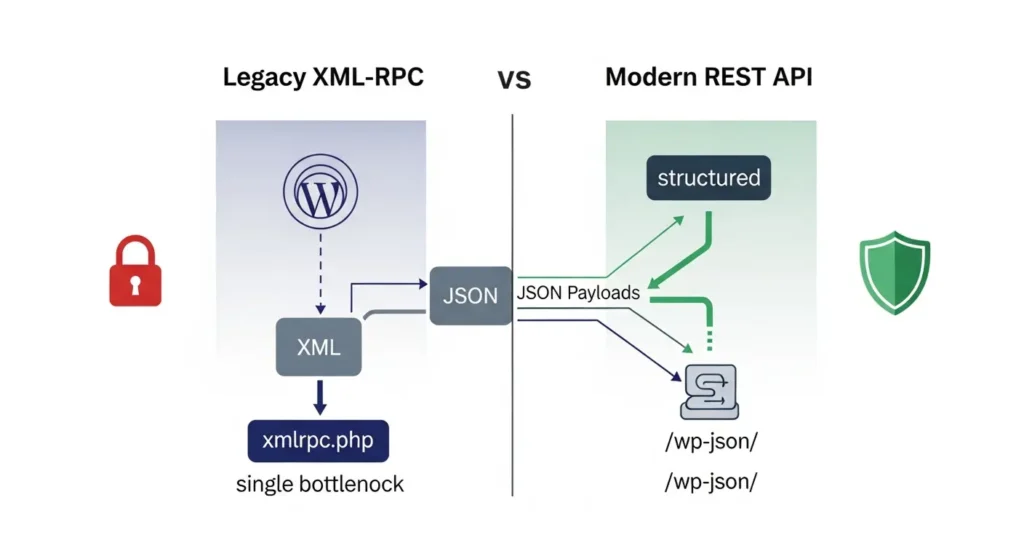
The introduction of the WordPress REST API completely shifted the landscape of WordPress development tools. Unlike the aging XML-RPC, the RESTful API provides a modern, structured, and secure JSON-based interface for interaction. It is more efficient, scalable, and granular in its permissions management.
Today, the vast majority of plugins, page builders, and modern mobile content management solutions use the WordPress REST API. Because the REST API provides a superior, standard-compliant way for applications to communicate with your site, the legacy XML-RPC API has become redundant. Maintaining the legacy file is essentially keeping a back door open to your database, as most modern systems no longer require it for connectivity.
Brute-force attacks using system.multicall

The most pressing risk associated with xmlrpc.php is its susceptibility to brute-force attacks targeting the system.multicall method. In a standard login scenario, an attacker is limited by the speed of their IP address and the security mechanisms of the login page. However, XML-RPC methods allow a perpetrator to bundle hundreds of login attempts into a single HTTP request using system.multicall.
This technique allows attackers to bypass standard two-factor authentication or rate-limiting security plugins that are only monitoring the primary login form. By making a single request that contains dozens of authentication attempts, an attacker can brute-force your password with extreme speed while staying under the radar of simple firewalls. This is a primary driver of brute force traffic seen on thousands of WordPress servers worldwide.
Pingback abuse
Another significant security risk involves the abuse of the pingback feature. While intended to notify you when another site links to your content, attackers have repurposed this function to initiate DDoS attacks. By forcing your server to “verify” a link via a pingback, an attacker can use your site as a weapon against other servers.
Furthermore, attackers often use pingbacks as a form of “port scanning” to map your server’s internal network or to identify vulnerabilities in your hosting provider’s environment. Because these requests originate from your own server, they are notoriously difficult to block without completely disabling the underlying XML-RPC functionality.
Increased server load
Beyond direct security exploits, the sheer volume of bot traffic targeting xmlrpc.php creates a massive performance drain. These bots constantly hammer the endpoint with requests, which triggers your server to initiate database queries, load the WordPress core, and execute PHP processes.
For high-traffic sites, this “background noise” can significantly inflate CPU usage and bandwidth consumption. By disabling this file, you are essentially telling your server to drop these requests before they consume any meaningful resources, protecting your site’s performance from being degraded by automated brute force attempts.
WordPress XML-RPC exploits
Throughout the history of WordPress 5.4.2 to the current WordPress 6.4.2, the xmlrpc.php file has been the subject of numerous Cybersecurity vulnerabilities. Common exploits include SQL injection, Cross-site scripting (XSS), and spam comments injected via automated tools.
Because it acts as a gateway for remote commands, any weakness in the XML-RPC authentication logic can lead to a full site compromise. While the core team works to patch these, the fundamental architecture of the file makes it a permanent target. Relying on patches is less effective than simply disabling the entire entry point.
Method 1: Visit xmlrpc.php directly

Before implementing any changes, you must verify whether your site is currently exposed. Open your browser and navigate to your domain.com/xmlrpc.php. If you see a message stating “XML-RPC server accepts POST requests only,” the file is active and reachable.
This test, alongside a simple curl command (curl -I https://yourdomain.com/xmlrpc.php), allows you to confirm that the endpoint is responding. If you receive a 403 or 404 error, you may have already blocked the file, or your WAF rule may be handling it automatically.
Method 2: Use an online XML-RPC validator
If you are unsure whether your site is being actively targeted, you can use an XML-RPC Validator or a third-party security scanner. These tools perform a handshake with your server to see if it accepts XML-RPC requests.
This is particularly useful if you are working with a team to audit your WordPress security posture. If the validator indicates that the service is live, you should proceed with the disablement steps immediately to reduce your attack surface.
How to know if your website actually needs XML-RPC
Before disabling it, audit your workflows to ensure you are not relying on legacy integrations. If you are using modern tools, you likely do not need it.
Do you publish using the WordPress mobile app?
Modern versions of the WordPress mobile app have largely moved to the REST API. However, if you are using a heavily customized or very old version of a mobile content management app, check your connection settings. If the app functions through the REST API, you are safe to disable XML-RPC.
Do you use Jetpack?
The Jetpack plugin has evolved significantly. While early versions required XML-RPC for cloud-to-site communication, most features in modern versions now utilize the REST API. If you have updated Jetpack recently, you can safely disable XML-RPC.
Do you use desktop blogging software?
Applications like MarsEdit or Open Live Writer sometimes still rely on the XML-RPC protocol for publishing. If you use these tools, test your publishing flow immediately after disabling the file to ensure no errors occur.
Do you use automation tools?
Some legacy automation tools (such as older IFTTT or Zapier integrations) may still use XML-RPC. Review your integrations to see if they support REST API authentication, which is the current industry standard.
Disabling the xmlrpc.php file is one of the most effective, “set-it-and-forget-it” security steps a site owner can take. By eliminating this legacy XML-RPC protocol, you effectively close a major door used for DDoS attacks, brute-force, and credential stuffing.
How to disable XML-RPC and secure your website
- Use a Plugin: For most users, Obzervi provides a seamless, one-click solution that completely mitigates XML-RPC exposure while actively monitoring your site’s activity logs and applying automated IP blocking to stop attackers in their tracks.
- Server-Level Protection: Advanced users can edit their .htaccess file (for Apache) or the IIS URL Rewrite module (for Windows servers) to use
Require all denied, ensuring the file is never processed. - Use the REST API: Always prefer plugins and tools that use the REST API over those requiring legacy XML-RPC support.
Conclusion
By taking these steps, you minimize your cybersecurity vulnerabilities and ensure your infrastructure is optimized for the modern web. Keep your WordPress versions updated, monitor your IP addresses for suspicious patterns, and maintain a proactive posture to keep your site resilient against evolving brute force attacks.
Not sure if XML-RPC is being attacked on your site? Obzervi can show you: install it free!
Frequently Asked Questions
What is XML-RPC in WordPress and what does it do?
XML-RPC is a legacy protocol built into WordPress that was originally designed to facilitate remote communication between external systems and your website. It enabled decentralized features before modern web standards existed, powering functions such as the older WordPress mobile app, desktop blogging clients, and “pingbacks” from other blogs via standard XML data transmissions handled by the xmlrpc.php file.
How does XML-RPC affect WordPress security?
XML-RPC heavily expands your site’s attack surface because its underlying architecture is highly vulnerable to modern exploits. Attackers actively target xmlrpc.php to bypass standard login forms and rate limits using system.multicall, which allows them to bundle hundreds of password guesses into a single HTTP request.
Why should I disable XML-RPC in WordPress?
You should disable XML-RPC because the modern WordPress REST API has completely replaced its functionality with a faster, more secure, JSON-based interface, rendering the old protocol entirely redundant. Leaving XML-RPC active is essentially keeping a dangerous backend door unmonitored.
How do I disable XML-RPC in WordPress?
Site owners can safely block the protocol by applying server-level restrictions or by utilizing an optimization plugin to drop the traffic instantly. Installing Obzervi handles this vulnerability effortlessly in a single click, immediately stopping remote brute-force requests before they can drain your server’s vital resources.
How can I tell if bots are actively exploiting my site’s xmlrpc.php file right now?
Traditional security approaches require you to manually parse through thousands of confusing lines of raw server log data or rely on external, passive web validators to check if the file is reachable. Obzervi eliminates the guesswork and gives you an unified dashboard to see exactly who is attacking your site so you can block their IPs instantly.
