

Introduction
As the web has evolved, a WordPress site is not merely a collection of pages; it is a complex ecosystem. If you have ever grappled with the mystery of a broken layout, unauthorized changes, or unexplained downtime, you know the frustration of not knowing “who, what, and when.” Standard WordPress core functionality is remarkably sparse when it comes to tracking user actions, leaving site administrators blind to critical modifications.
This is where activity log plugins become indispensable.
What are the Best WordPress Activity Log Plugins (2026)?
Whether you are managing a small blog or a complex multisite network, maintaining a comprehensive audit trail is a cornerstone of professional site management. By tracking everything from plugin updates to failed login attempts, these tools transform your admin dashboard into a command center for security and operational transparency. In this guide, we will move beyond basic listicles to help you navigate the landscape of the best WordPress activity log plugins, ensuring you choose a solution that aligns with your security requirements and performance needs.
Logging coverage
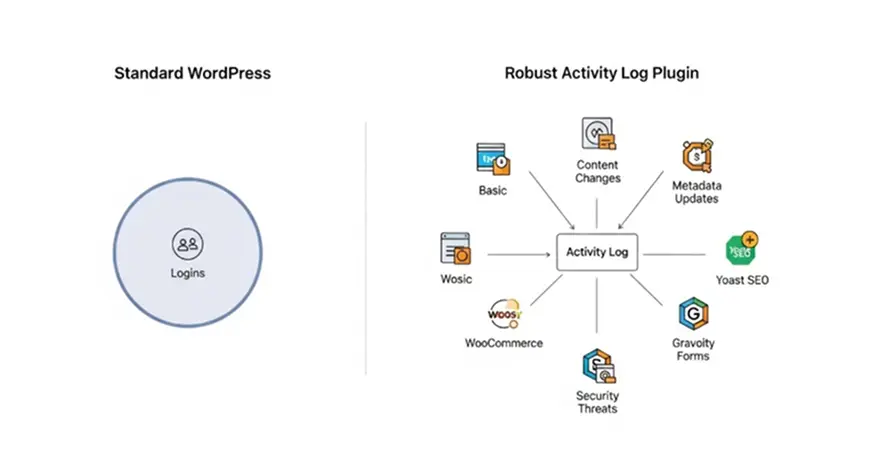
True logging coverage must extend far beyond simple user logins. A robust WordPress activity log should capture granular user activity, including content changes, metadata updates, and modifications to Post types. When evaluating the best WordPress activity log plugins, look for deep integration with WordPress plugins like Yoast SEO or WooCommerce Subscriptions. If your site relies on MetaSlider Slideshow or Gravity Forms, you need a plugin that logs the configuration changes and administrative edits within those tools. Without this depth, your audit trail will contain blind spots that could hide security threats or operational errors.
Ease of use
For busy professionals, an activity log is only as good as its interface. The best tools offer an intuitive way to visualize user actions without requiring a degree in database management. You should be able to identify who changed a plugin setting or updated a user role within seconds. Plugins like Simple History excel here by offering a clean, WordPress-native interface, while more advanced tools provide dedicated monitoring dashboards. The goal is to minimize the time spent hunting for information while maximizing your visibility into the WordPress site.
Search and filtering
As your database grows, finding a needle in a haystack becomes a reality. High-traffic WordPress websites generate massive amounts of log data daily. An effective plugin must offer advanced filtering capabilities that allow you to isolate events by user, severity, or date range. Whether you are investigating suspicious behavior detection or simply verifying plugin updates, the ability to drill down through thousands of entries is non-negotiable. Look for tools that support precise queries, as this speed is critical during active security breaches.
Notifications and reporting

A log is passive, but an alert is active. To maintain proactive WordPress security, your plugin must support real-time email notifications for high-priority events, such as unauthorized administrative access or critical plugin settings changes. Furthermore, the ability to generate automated reports in CSV/JSON exports is vital for teams that need to review weekly system performance. This ensures that you aren’t just logging errors but are also keeping your team informed of significant changes as they occur.
Security capabilities
Logging is a prerequisite for security, but some plugins go further. They serve as a security suite by monitoring IP addresses to detect brute-force login attempts and providing AI-powered threat detection. Advanced solutions often integrate two-factor authentication (WP 2FA) to harden access points. By logging these events alongside traditional system activities, you create a defensive layer that helps you distinguish between a routine site update and a coordinated malicious attack.
Compliance support
For organizations subject to regulations like GDPR Compliance or SOC 2, the activity log is a legal necessity. Your plugin must support strict retention policies to ensure you aren’t storing PII (Personally Identifiable Information) indefinitely while still maintaining the required historical audit trail. The ability to export these logs securely for auditors is a critical feature for any business-grade WordPress security strategy.
Value
When assessing value, consider the trade-off between performance and features. Heavy logging can tax your server, which is why professionals often look for options that allow offloading logs to an external database or services like AWS CloudWatch. While a free plugin might suffice for a personal blog, a growing business needs the reliability, priority support, and enterprise-grade performance that paid versions of WP Activity Log or similar tools provide.
What These Plugins Do Best
- Comprehensive Audit Trail: Full visibility into user accounts and content edits.
- Security Event Logging: Tracking login attempts, IP addresses, and session management.
- Performance Optimization: Options for external database storage and custom retention policies.
- Advanced Alerts: Real-time alerts via email for high-risk user actions.
- Compliance Ready: Features supporting GDPR Compliance and SOC 2 reporting.
- System Integrity: Monitoring plugin files, core file changes, and database modifications.
Key Advantages
- Enhanced Security: Active monitoring of security threats allows for faster incident response.
- Accountability: Full traceability of user activity ensures every change is logged.
- Troubleshooting Efficiency: Quickly identify which third-party plugins or plugin updates caused a site conflict.
- Regulatory Alignment: Simplifies the process of meeting compliance requirements for data auditing.
Technical Considerations
- Database Bloat: Without proper retention policies or an external database, logs can consume significant storage.
- Performance Impact: High-frequency logging on high-traffic sites may require careful configuration to avoid performance degradation.
- Learning Curve: Advanced WordPress activity log plugins can be complex to configure correctly for enterprise-grade environments.
Free vs. Premium Tiers

Most activity log plugins follow a “freemium” model. Basic logging is often free, while advanced features—such as external database support, long-term archiving, and sophisticated email notifications—are reserved for premium tiers. We recommend reviewing the latest pricing models directly on the vendors’ websites, as enterprise features often vary significantly between WP Activity Log, Simple History, and other specialized WordPress plugins.
Quick Comparison
| Plugin | Free Version | Logging Depth | AI Analysis | IP Blocking | Notifications & Reports | Enterprise Features | Best For |
|---|---|---|---|---|---|---|---|
| Obzervi | ✅ | ★★★★☆ | ✅ | ✅ | ✅ | Partial | All-in-one security & logging |
| WP Activity Log | ✅ | ★★★★★ | ❌ | ❌ | ✅ | ✅ | Enterprise & compliance |
| Simple History | ✅ | ★★★☆☆ | ❌ | ❌ | Limited | ❌ | Lightweight logging |
| User Activity Log | ✅ | ★★★☆☆ | ❌ | ❌ | Premium | ❌ | Budget user tracking |
| Sucuri Security | ✅ | ★★☆☆☆ | ❌ | Firewall (Paid) | Security alerts | Partial | Security suite |
Obzervi — Best Overall WordPress Activity Log Plugin
Best for: Businesses, agencies, and WordPress site owners who want activity logging, AI-powered threat analysis, and security protection in one plugin.
Unlike traditional activity log plugins that simply record events, Obzervi is built around a different philosophy:
Don’t just collect information.
Help administrators understand it—and respond to it.
Instead of forcing you to manually inspect thousands of log entries, Obzervi analyzes activity using AI to identify suspicious behavior, unusual login patterns, and potential security threats.
Even better, it includes built-in IP blocking so you can stop abusive visitors without installing additional security plugins.
Key Features
- Complete WordPress activity log
- Login and logout history
- User management tracking
- Plugin and theme monitoring
- Settings change history
- AI-powered activity analysis
- Suspicious behavior detection
- Searchable dashboard inside wp-admin
- Exportable audit logs
- Built-in IP blocking
- Compliance-friendly audit trail
Pros
✅ Three tools in one plugin
Instead of combining an activity logger, security plugin, and monitoring tool, Obzervi brings them together.
✅ AI explains what’s happenin
Traditional logs answer:
“What happened?”
Obzervi also helps answer:
“Should I be worried?”
Its AI layer highlights unusual patterns that could otherwise be buried among thousands of routine events.
✅ Active protection
Unlike most dedicated activity log plugins, Obzervi doesn’t stop at visibility.
It allows administrators to block malicious IP addresses directly from the platform, helping prevent repeated attacks instead of simply recording them.
✅ Easy to understand
The interface focuses on surfacing meaningful information rather than overwhelming users with raw event data.
This makes it particularly attractive for:
- Small businesses
- Marketing teams
- Agencies
- Non-technical administrators
Limitations
To keep this comparison fair, it’s worth noting where Obzervi is still growing.
Compared with long-established platforms like WP Activity Log, its ecosystem of third-party integrations and plugin-specific event sensors is still expanding.
Organizations that require exhaustive logging across dozens of enterprise plugins may find WP Activity Log offers broader coverage today.
For most websites, however, Obzervi records the events administrators care about most while adding security capabilities that many traditional logging tools don’t provide.
Pricing
Obzervi offers:
- Free
- Pro
- Business
Because pricing can change over time, we recommend checking the latest plans directly on the Obzervi website before making a decision.
Verdict
If your goal is simply to generate an audit trail, there are several excellent plugins available.
If your goal is to understand what’s happening on your website and respond quickly when something looks suspicious, Obzervi offers one of the most compelling all-in-one solutions currently available.
Editor’s Rating: ⭐⭐⭐⭐⭐
Conclusion
Choosing the best WordPress activity log plugin is a fundamental step in securing your digital assets. Whether you opt for a lightweight tool or a comprehensive security suite, the primary goal remains the same: total visibility into the system activities occurring on your WordPress site.
By implementing a solution that monitors user sessions, logs critical user actions, and integrates seamlessly with your existing workflow, you move from a reactive security posture to a proactive one. Remember to prioritize plugins that offer external database options to protect your site’s performance and ensure your chosen tool is actively maintained to defend against evolving security threats. Start with a clear assessment of your compliance and operational needs, and select the plugin that provides the perfect balance of depth and usability for your specific requirements.
Frequently Asked Questions
What is a WordPress activity log and why is it important?
A WordPress activity log is a comprehensive, chronological record of every modification, update, and user action that takes place across your core system and third-party plugins. It is vital for professional site management because standard WordPress keeps you completely blind to critical backend changes, making an activity log your first line of defense during security breaches or unexplained downtime.
Are logs necessary or even helpful for WordPress?
Yes, maintaining detailed logs is an operational and compliance necessity for any growth-minded WordPress website. Without an active audit trail, identifying which third-party plugin caused a site crash, verifying a malicious file modification, or tracking unauthorized administrative adjustments becomes a near-impossible task.
How do I monitor user login activity?
You can monitor login activity by installing a tracking suite that captures every authentication attempt, session timestamp, and corresponding IP address on your dashboard. While traditional logging tools simply document this information after a breach occurs, Obzervi equips your site with active threat detection out of the box. It actively logs login and logout behaviors while automatically employing a tiered IP banning system to detect and isolate brute-force attackers the moment they try to compromise your forms.
Can you see the editing history of a WordPress website?
Yes, a proper activity log allows administrators to view the exact traceability of content modifications, page revisions, user accounts management, and setting overrides. While basic tracking plugins only output minimal, confusing rows of code, Obzervi provides clear, searchable insights, letting you inspect exactly what was changed, when it happened, and who did it, with zero guesswork.
What is the best WordPress activity log plugin available?
While long-established platforms like WP Activity Log offer detailed passive tracking, Obzervi is the best choice for modern web developers, marketing agencies, and small businesses. It seamlessly consolidates activity logging, AI-driven behavior analysis, and automated IP security into a single, cohesive dashboard at one simple price point.
