
A WordPress audit log is something most site owners assume already exists, a comprehensive record of everything that happens “under the hood.” The reality is a significant blind spot: WordPress core does not maintain a native, granular audit log. If a site suffers a security breach or a critical configuration error occurs, administrators are often left guessing about the root cause.
Moving beyond simple plugin installations, professional site governance requires a dedicated audit log to maintain accountability and operational oversight. This article serves as your guide to shifting from reactive troubleshooting to proactive site management, ensuring your environment remains secure, compliant, and transparent.
This guide is for general information only and isn’t legal advice. Consult a qualified professional about your specific GDPR, SOC 2, or HIPAA obligations.
Key takeaways
- WordPress core requires a third-party plugin to track administrative history.
- Compliance (GDPR, SOC 2, HIPAA) is impossible without an audit trail.
- Focus on real-time alerts to stop a security breach before it escalates.
- Use external databases to maintain performance optimization on large sites.
- Multisite networks require centralized logging for total visibility.
Who changed this, and when?
Whether you are managing a single blog or a massive enterprise site, the ability to pinpoint the “who, what, and when” of site changes is the cornerstone of WordPress security. When a security breach occurs, or even when a simple conflict arises from third-party plugins, you need a reliable audit trail. Without it, you are flying blind.
This guide explores the strategic necessity of logging system activities and user actions, providing the framework required for modern regulatory compliance and robust site maintenance.
What is a WordPress audit log?
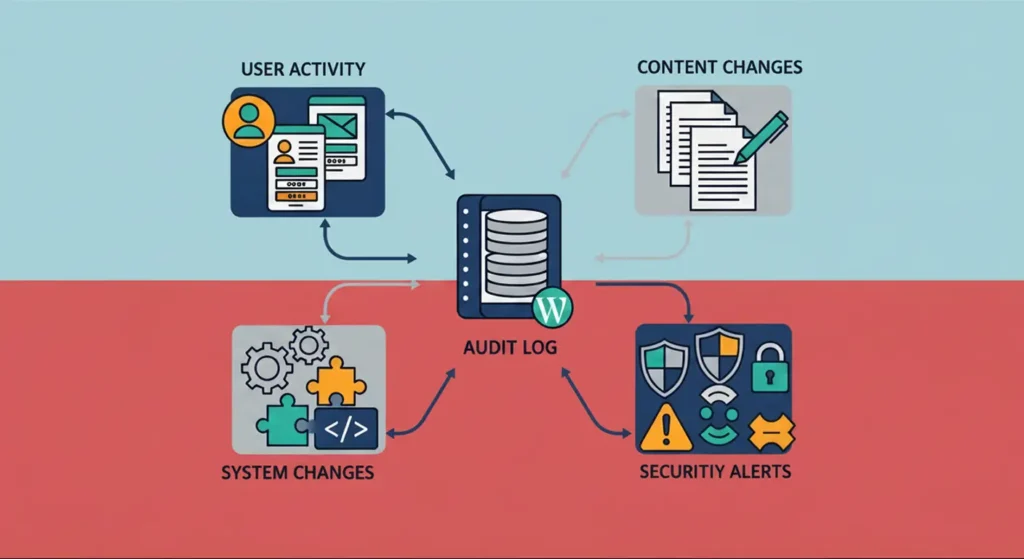
A comprehensive WordPress audit log captures data across four main categories to provide a complete picture of your site’s health and security.
A WordPress audit log, frequently referred to as an Activity Log or a WordPress activity log, is a timestamped, indexed record of critical events happening within your site’s ecosystem. It is not merely a list of errors; it is a comprehensive history of the site’s life.
By utilizing activity log plugins, you can capture:
- User activity: Logins, logouts, and password resets.
- Content changes: Post status transitions, edits, and deletions.
- System changes: Plugin updates, theme installations, and core configuration tweaks.
- Security alerts: Login attempts, failed access attempts, and permission changes.
These logs transform opaque site activity into actionable intelligence.
WordPress doesn’t provide this by default
Many users believe that built-in revisions are sufficient. However, revisions only track content; they do not track administrative tasks. If someone changes an IP address setting, modifies a security policy, or creates a new unauthorized admin account, the standard environment leaves no footprint.
Why audit logs are a compliance requirement, not just security
Accountability
Accountability is about clear attribution. When you have a granular activity log, you can tie every action to a specific user account. This prevents the “shared account” problem where multiple people use the same login, making it impossible to identify the source of an error.
Detection
Logs act as an intrusion detection system. By monitoring login attempts and recording the IP address associated with each action, you can quickly identify brute-force attacks or suspicious patterns of behavior that indicate a compromise.
Evidence
In the eyes of an auditor, an unlogged system is a non-compliant system. An audit trail serves as the primary evidence during a security audit log review, proving that your security controls are not just theoretical, but operational.
Common compliance scenarios
- Unauthorized Installations: A contractor installs a malicious plugin; the log flags it immediately.
- Accidental Deletions: A store manager deletes a critical product category; the log reveals who did it and when.
- Data Breaches: An auditor requires a record of who accessed customer records during a specific window.
WordPress audit logs and GDPR compliance
Article 5(2): Accountability
GDPR mandates that you demonstrate compliance. An audit log provides the documentation needed to prove that you are actively managing user accounts and monitoring sensitive information.
Article 32: Security of processing
This article requires “appropriate technical measures.” Using a plugin to log user activity and monitor IP addresses qualifies as a necessary security measure to protect data integrity.
Article 30: Records of processing activities
While not a replacement for legal documentation, logs serve as the raw data that supports your internal records of how data is processed and accessed.
Supporting breach investigations
If a data breach occurs, GDPR requires swift action. A robust log allows you to conduct a forensic investigation to determine the scope of the incident within the mandatory 72-hour notification window.
Remember: logs can contain personal data
Because logs capture IP addresses and usernames, the logs themselves must be treated as sensitive data. Use retention policies to purge old logs, protecting your users’ privacy.
WordPress audit logs and SOC 2 compliance
CC6: Logical Access Controls
SOC 2 requires strict management of access. Your security audit log must track all privilege escalations and admin-level changes to satisfy these criteria.
CC7: System Operations and Monitoring
You must prove your site is being monitored. Logs showing constant activity monitoring satisfy the requirement for proactive system observation.
Type II requires ongoing evidence
SOC 2 Type II is about consistency over time. You cannot simply turn on a log a week before the audit; you must demonstrate a history of consistent logging.
Auditors look for consistency
Inconsistency is a red flag. Ensure your logging is automated and comprehensive, covering all administrative segments.
WordPress audit logs and HIPAA compliance
What is ePHI?
Electronic Protected Health Information (ePHI) is any health information stored or transmitted electronically. If your site handles this, logging is non-negotiable.
HIPAA also requires activity review
The “Audit Controls” standard (45 CFR §164.312(b)) mandates that you record and examine activity in systems containing ePHI.
Audit logs don’t make WordPress HIPAA compliant
Logging is a part of compliance, not the whole. You must pair logs with encryption, secure hosting, and BAAs.
Not all logs are audit logs
WordPress and your hosting environment already generate several technical logs, PHP error logs, debug logs, access logs, MySQL logs, and so on. These are useful for troubleshooting, but none of them function as a WordPress audit log. They don’t attribute actions to a specific user, they’re rarely retained long enough to satisfy a retention policy, and auditors reviewing GDPR, SOC 2, or HIPAA controls won’t accept them as evidence of who did what on your site.
What should a compliant WordPress audit log capture?
A professional security audit log must capture the following:
- User logins and failed login attempts.
- User creation and modification.
- Plugin updates and settings changes.
- File uploads and modifications.
- WooCommerce logs (for store manager changes, stock quantities, and price edits).
- Yoast SEO and Gravity Forms settings adjustments.
Best practices for WordPress audit logging
- Use an External Database: For high-traffic sites, store logs in an external database to avoid performance bottlenecks.
- Real-Time Alerts: Configure email notifications for critical events, such as a user becoming an administrator.
- Strict Retention: Define a clear retention policy based on your business and legal requirements.
- Regular Audits: Don’t just collect data, it’s important to review it. Use report generation tools to create monthly HTML reports.
Auditing WordPress Multisite Networks
In a standard WordPress multisite network, each subsite keeps its own database tables, which means each one generates its own isolated activity log by default. For a single administrator, that’s manageable. For an auditor or a compliance officer reviewing a network of ten, twenty, or more subsites, it’s a serious problem: there’s no single place to confirm who did what across the entire network.
This matters more than it might seem for GDPR, SOC 2, and HIPAA reviews specifically, since all three expect consistent, comprehensive monitoring, not monitoring that exists on some subsites and not others. A gap on even one subsite in the network can be enough to fail an audit.
The fix is centralized logging: one dashboard that aggregates activity across every subsite in the network, instead of requiring a manual review site by site. Obzervi’s Business and Agency plans include this as multisite management, giving administrators a single view of activity, along with network-level blocklists that apply protection across the whole network at once rather than configuring each subsite individually.
Frequently Asked Questions
How to set up an audit log in WordPress
Obzervi produces exportable, audit-ready trails automatically, so there’s no scrambling to reconstruct activity history when a reviewer asks for evidence.
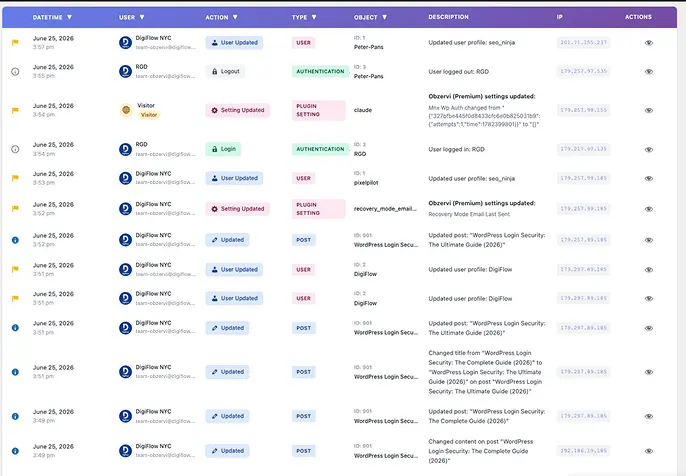
- Timestamped, attributable logging: every login, edit, plugin change, and settings update is tied to a specific user, timestamp, and IP address the moment it happens, satisfying the attribution requirement behind GDPR Article 5(2) and SOC 2’s CC6 access controls.
- AI analysis that flags what matters: instead of manually reviewing thousands of log entries before an audit, Obzervi’s built-in AI surfaces unusual patterns, such as a spike in failed logins or an account suddenly gaining admin privileges, in plain language.
- CSV, JSON, and HTML exports: generate a clean report for an auditor or compliance officer in a few clicks, instead of pulling raw data together manually.
- Centralized multisite logging: for networks, one dashboard aggregates activity across every subsite, closing the visibility gap covered earlier in this guide.
Obzervi is free to install, with Pro and Business plans adding longer retention windows and priority support for teams managing ongoing compliance requirements.
Does WordPress have a built-in audit log?
No. WordPress core provides basic post revisions but lacks the deep forensic capability needed for professional security hardening.
Is an audit log required for GDPR?
While not explicitly named, it is the primary tool used to demonstrate the “Accountability” required by the regulation.
Does an audit log make my site HIPAA compliant?
No. It is a necessary technical safeguard, but compliance requires a full security suite, including two-factor authentication and encryption.
How long should I keep WordPress audit logs?
Retention periods vary, but many industries require a minimum of one to three years. Consult with your legal counsel regarding your specific compliance frameworks.
Do audit logs slow down WordPress?
Not if implemented correctly. By using an external database and proper performance optimization settings, you can ensure the site remains fast while the logs remain detailed.
What’s the difference between an audit log and an activity log?
In the context of WordPress security, they are effectively the same. “Audit log” is a term favored by compliance professionals, while “activity log” is used by developers and site owners.
Can I export WordPress audit logs for an auditor?
Yes. Modern plugins allow you to generate CSV/JSON exports or HTML reports, which are essential for professional security professionals during an audit.
Conclusion
Implementing a robust WordPress audit log is not just about catching hackers; it is about taking control of your platform’s operational integrity. By tracking user activity, monitoring third-party plugins, and ensuring your system activities are recorded, you move your site into a state of professional governance.
Whether you are managing a small blog or a complex multisite network, the right logging strategy, paired with a dedicated activity log plugin, will provide the transparency needed for both daily operations and long-term regulatory success.
Install Obzervi for free and start tracking user activity in WordPress today.
